#claudecode
- https://anthropic.skilljar.com/claude-code-in-action/
# What is Claude Code
- Coding assistant 工作流程
1. 将用户 prompt 发送给 LLM,along with some tool definitions
2. LLM 来决定运行 tool(通过特殊格式的 response)
3. 由 assistant 来运行 tool,并将 tool call 结果发给 LLM
```mermaid
sequenceDiagram
participant You
participant CodingAssistant as Coding Assistant
participant LanguageModel as Language Model
You->>CodingAssistant: What code is written <br/>in the main.go file?
CodingAssistant->>LanguageModel: What code is written <br/>in the main.go file?<br/> If you want to read <br/> a file, respond with <br/>"ReadFile: name of file"
LanguageModel-->>CodingAssistant: ReadFile: main.go
CodingAssistant->>LanguageModel: <Contents of main.go file>
LanguageModel-->>You: The main.go file contains code to initialize the application and...
```
----
# Getting hands on
## CLAUDE.md
- 每次请求 Claude 都会携带该文件
- 两个目的:
1. 帮助 Claude 理解 codebase,快速找到相关文件
2. 我们可以在这里给 Claude 一些 Guidance
- 不同位置:
- **`CLAUDE.md`**:`/init`生成,提交到代码库,与其他人共享
- **`CLAUDE.local.md`**:不与其他人共享,包括了个人的指令和对 Claude 的定制
- **`~/.claude/CLAUDE.md`**:本地所有项目共同使用
## Adding context
### File mention
- File mentions with `@`
- `@` + `path to file`
- 指示 Claude 读取指定的文件, 可以一次性引用多个文件
### Memory instruction
- `# [instruction]`:添加指令到 project memory
- 例:`# The database schema is defined in the @prisma/schema-prisma file. Reference it anytime you need to understand the structure of data stored in the database.`
- 等下次询问 schema 相关问题时,会自动读取该 schema 文件
## Making changes
### 截图粘贴
- `ctrl + v`:可以粘贴图片(例如截图)
### Planning Mode
- 启用:两次`shift + tab`
- ==只读==,分析 codebase,创建详细的实现计划而不修改任何文件。
- 使用场景:
- task that requires a **wide understanding** of your codebase and requires looking at different areas.
- task that requires **several steps** to complete
### **Thinking Mode**
- Allow Calude to reason about more ==challenging== problem.
- 提示词中增加 trigger phrases:从弱到强
1. "Think"
2. "Think more"
3. "Think a lot"
4. "Think longer"
5. "Ultrathink"
- 适用场景:
- tricky logic or troubleshooting a difficult bug
- planning 和 thinking 可以结合一起使用。
- planning 类似 BFS,thinking 类似 DFS
- 两种都会消耗额外的 tokens
### Git assistant
- "> Stage and commit changes"
## Controlling context
### Interrupting
- `ESC`
- interrupt Claude, allowing you to redirect to it or give alternative instructions
- 例如添加 memory 指令,避免 Claude 犯错
### Rewind a Conversation
- `Escape` + `Escape`
- Revert to a previous message
### Compact
- `/compact`
- clear conversation history but keep a summary in context.
- 总结当前 session 的所有会话历史
- 适用场景:
- 想在后续任务中==继承==之前的 knowledge
- 之前的会话历史已经很大,可能超过 token limit,开始丢失细节
- long-runing session
### Clear
- `/clear`
- Clear conversation history,适合开始一个全新的==不相关==的任务。
## Custom commands
- 自定义 `/cmd`
- 例如创建 `/audit` 命令
- 项目目录下创建文件:`.claude/commands/audit.md`
```md
This audit command does three things:
1. Runs `npm audit` to find vulnerable installed packages
2. Runs `npm audit fix` to apply updates
3. Runs tests to verify the updates didn't break anything
```
- 创建完后重启 Claude code
- **带参数的命令**:`write_tests.md`
- ```
Write comprehensive tests for: $ARGUMENTS
Testing conventions:
* Use Vitests with React Testing Library
* Place test files in a __tests__ directory in the same folder as the source file
* Name test files as [filename].test.ts(x)
* Use @/ prefix for imports
Coverage:
* Test happy paths
* Test edge cases
* Test error states
```
- 调用:``/write_tests the use-auth.ts file in the hooks directory``
- 参数将会替换 `$ARGUMENTS`
- 参数比较灵活
- 不一定必须是文件路径,可以是任意 string,只需要给出 Claude 任务相关的 context 和 directions
## MCP servers with Claude Code
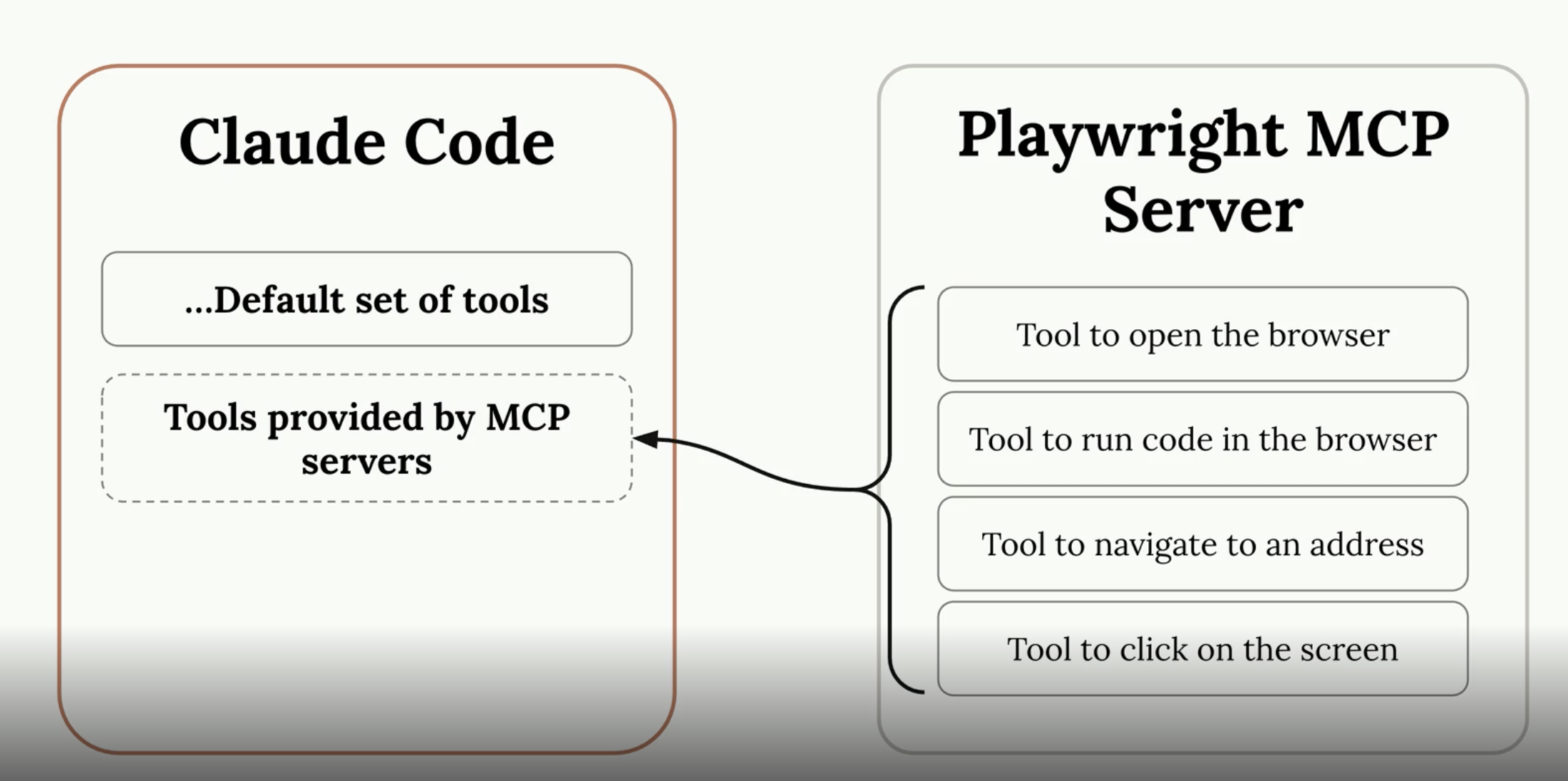
- MCP server 运行在本地或远程
- Playwright:控制浏览器
- 安装:
- `claude mcp add playwright npx @playwright/mcp@latest`
- 在 Claude code 中使用:
- `> open the browser and navigate to localhost:3000`
- 权限设置:`.claude/settings.local.json`
```json
{
"permissions": {
"allow": [
"mcp__playwright"
]
}
}
```
- workflow:
```prompt
"Navigate to localhost:3000, generate a basic component, review the styling, and update the generation prompt at @src/lib/prompts/generation.tsx to produce better components going forward."
```
## Github integration
- 允许 Claude code 在 github action 中运行
- https://github.com/anthropics/claude-code-action
- actions:
- Mention action
- Pull request action
-----
# Hooks and the SDK
## Introducing hooks
- Hooks 可以在 Claude Code 执行某些操作之前或之后运行命令。也可选择**阻止** Claude 的操作。
- 在 Claude 编辑文件后格式化
- 阻止Claude编辑或读取特定文件
- 更改文件后自动运行测试
- 如果添加了不符合命名约定的变量,则阻止文件编辑
- 阻止使用已弃用的函数
- **Hook 运行原理**
- just before or after the tool execution
```mermaid
sequenceDiagram
participant You
participant ClaudeCode as Claude Code
participant Claude
You->>ClaudeCode: What code is written<br/>in the main.go file?
ClaudeCode->>Claude: What code is written <br/>in the main.go file?<br/> If you want to read <br/> a file, respond with <br/>"ReadFile: name of file"
Claude-->>ClaudeCode: (Use tool response)<br/>ReadFile: main.go
Note over ClaudeCode: PreToolUse hook runs
Note over ClaudeCode: Claude Code reads the file
Note over ClaudeCode: PostToolUse hook runs
ClaudeCode->>Claude: <Contents of main.go file>
```
- **Hook Definitions**
- 定义位置:
- **Global:** `~/.claude/settings.json`
- **Project:**`.claude/settings.json`
- **Project(not committed):**`.claude/settings.local.json`
- 通过手写或者 `/hooks` 命令
> [!INFO]- hook example json
> ```json
> {
> "hooks": {
> "PreToolUse": [
> {
> "matcher": "Read",
> "hooks": [
> {
> "type": "command",
> "command": "node /home/hooks/read_hook.ts"
> }
> ]
> }
> ],
> "PostToolUse": [
> {
> "matcher": "Write|Edit|MultiEdit",
> "hooks": [
> {
> "type": "command",
> "command": "node /home/hooks/edit_hook.ts"
> }
> ]
> }
> ]
> }
> }
> ```
- PreToolUse hook
- 可以阻止 tool call,返回一个错误信息给 Claude。
- PostToolUse hook
- 无法阻止 tool call,但可以提供额外的 feedback 给 Claude。
## Defining hooks
- Build a hook 步骤:
1. Decide on a PreToolUse or PostToolUse hook
2. Determine which type of tool calls you want to watch for
3. Write a command that will receive the tool call
4. If needed, command should provide feedback to Claude
| Tool Name | Purpose |
| ------------------- | ------------------------------------------------ |
| Read | Read a file |
| Edit, MultiEdit | Edit an existing file |
| Write | Create a file and write to it |
| Bash | Execute a command |
| Glob | Find files/folders based upon a pattern |
| Grep | Search for content |
| Task | Create a sub-agent to complete a particular task |
| WebFetch, WebSearch | Search or fetch a particular page |
- 让 claude code 列举 tools
- `❯ list out the names of all the tools you have access to,bullet point list`
- **Tool Call Data** Structure
- 当定义的 hook command 执行时,claude 将会通过标准输入将 tool call data 发送给 command
- json 格式,包含了 tool call 的详细信息
```json
{
"session_id": "2d6a1e4d-6...",
"transcript_path": "/Users/sg/...",
"hook_event_name": "PreToolUse",
"tool_name": "Read",
"tool_input": {
"file_path": "/code/queries/.env"
}
}
```
- Your command
- Exit code 0: All is well
- Exit code 2: 阻止 tool 运行(PreToolUse 特定),stderr logs 会发送给 Claude 作为 feedback
## Useful hooks
- TypeScript Type Checking Hook
- PostToolUse
- 编辑后执行检查,并将检查结果反馈给 Claude,让其自动修复问题。
- Query Duplication Prevention Hook
- PreToolUse
- 当修改指定目录下的文件时,使用 SDK 启动另一个 Claude Code 示例来 review 变更,检查是否已有相同的功能。
- 如果出现重复,反馈 Prompt ==指示== Claude 去除重复;
- Principles:
- Use compiler/linter output to provide immediate feedback
- Implement code review processes using separate AI instances
- Focus monitoring on high-value directories where consistency matters most
- Balance automation benefits against performance costs
- 除了 `PreToolUse` 和 `PostToolUse`之外其他的 Hooks:
- `Notification`:当 CC 发送 notification 时运行(例如 CC 需要权限或者闲置了 60 秒)
- `Stop`:当 CC 完成 responding 后运行
- `SubagentStop`:当 subagent 运行完成后运行
- `PreCompact`:compact 操作(包含手动和自动)之前运行
- `UserPromptSubmit`:用户提交了一个 prompt, CC 处理之前
- `SeesionStart`:当开始或 resume 一个 session 时
- `SeesionEnd`:session 结束时
- Tips:各种 hooks 给 command 的输入格式不一样,可以先写入到文件中检查一下。
## The Claude Code SDK
- 支持 Typescript,Python 和 CLI,程序化地运行 Claude Code。
- Inherits all the settings of an instance of Claude Code launched in the same directory
- 默认只读权限
- Useful as part of a larger pipeline or tool
----
# TODO
- [ ] hooks 中使用绝对路径(需要获取当前项目的绝对路径)